


Dynamic Leverage. Up to 1000:1.
Tied to position size, not account balance. Tier-throttled as exposure grows. Available across forex, metals, indices, energies, and crypto on every Edge account.
Calibrated per position, not per account

Per position

Not per account

Tiered, not stepped

Across all assets
Here's an actual ladder
This is the live EUR/USD leverage ladder on Edge accounts. As your position's notional value crosses each band, the leverage steps down for the portion above that threshold.
$1,500,000 EUR/USD on an Edge account
Why dynamic beats a flat number
One number for every size
Sized for worst case
Smaller trades over-margined
Penalises account growth
No tail-risk control
The right number for the size
Aggressive on small positions
Tier-throttled on large positions
Balance never changes the ceiling
Consistent across asset classes
Same engine on every XBTFX terminal
Dynamic leverage is enforced at the matching engine — your platform just surfaces it. Here's how it shows up in xPro and MetaTrader 5.
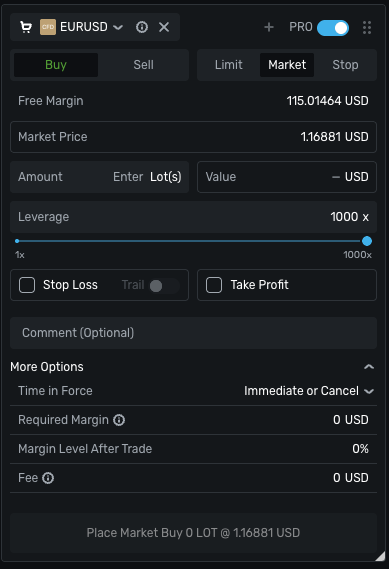
Dial in leverage on the ticket.
xPro shows the dynamic leverage slider directly on the order ticket. Drag it as high as 1000x for small positions; required margin recalculates live as you size up. The slider's ceiling always reflects the symbol's current tier.
- Live required margin calculation as you size up
- Slider capped automatically by the active tier — no surprises
- Enforced at the engine — tickets can't bypass the ladder
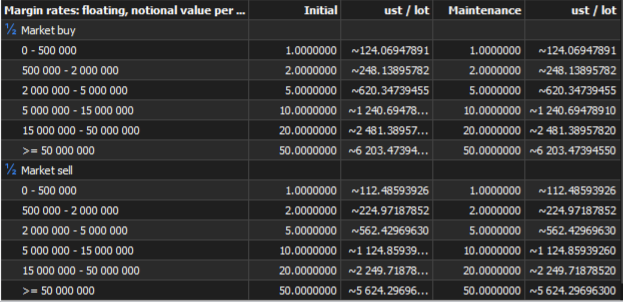
Full ladder visible on every symbol.
Open any symbol's Specification panel in MT5 to see the full floating notional margin rates table — every band, initial and maintenance margins. The same numbers the engine uses. No guesswork, no hidden steps.
- Per-symbol bands inside Market Watch → Specification
- Both initial and maintenance margins published per tier
- Identical to Trading Conditions — your reference of truth
Top-tier leverage at a glance
Each symbol has its own ladder calibrated to instrument volatility and liquidity. Here are four representative top tiers — the full per-symbol breakdown lives on Trading Conditions.

Frequently
Asked Questions
Frequently Asked Questions
Everything you need to know about how dynamic leverage works on Edge accounts.
-
Does my account balance affect my leverage?
No. Edge dynamic leverage is tied to your position's notional value (size × price), not your balance. A trader with $1,000 and a trader with $1,000,000 both get the same maximum leverage on the same-sized position.
-
What happens if my position size crosses a tier boundary?
Tiers apply incrementally. Each portion of your position's notional value gets the leverage of the band it falls into — so a position partially in the second tier uses tier-1 margin for the first slice and tier-2 margin for the slice that crosses over.
-
Why use dynamic leverage instead of a flat number?
Fixed-leverage accounts apply the same multiplier whether you trade 0.01 lots or 100 lots — which means the broker has to set a low ceiling for everyone to manage tail risk. Dynamic leverage lets smaller positions enjoy aggressive leverage while large positions are tier-throttled, so we can offer 1000:1 at the top end without taking on outsized exposure.
-
Does dynamic leverage apply to crypto and metals?
Yes. Edge dynamic leverage applies across every asset class — forex, indices, metals, energies, and cryptocurrencies. Each symbol has its own ladder; see the Trading Conditions page for the per-symbol breakdown.
-
Is dynamic leverage available on Standard accounts?
No. Standard accounts use fixed leverage up to 500:1 with commissions baked into the spread. Dynamic leverage and the 1000:1 ceiling are exclusive to Edge.
-
Where do I see the full tier ladder for a specific symbol?
On the Trading Conditions page, switch the Asset Class tab to your category, choose Leverage & Specs, and click any symbol row to expand its full tier table.